
What Site Managers Should Look for in Drawing Software
Picking the right drawing software is one of the most consequential decisions a site manager makes on a project. Choose well, and the whole team works from a single, trusted source of drawings. Choose poorly, and you end up with version confusion, missed RFIs, and the kind of rework that quietly eats into margins all the way to handover.
Research by PlanGrid and FMI surveying nearly 600 construction professionals tied more than $31 billion in annual US rework costs to poor communication and missing project information, with miscommunication driving 26 per cent of rework and bad documentation or inaccurate drawings accounting for a further 14 to 22 per cent. That data is a wake-up call: if your drawing software does not actively prevent those problems, it is costing you money on every project. Therefore, audit your current toolset against the features in this guide, and switch if it falls short.
This article breaks down the seven most important things to look for in site manager drawing software, ranked by their practical impact on daily site operations. We also cover how integrated site manager RFI software changes the game, and what to prioritise based on your team size and project type.

Key Takeaways
Version control is non-negotiable: Drawing management is the discipline of organising, versioning, distributing, and controlling access to project drawings throughout a project's lifecycle, without it, out-of-date plans reach the job site, teams waste time searching for files, and miscommunication leads to costly rework. If your software does not automatically supersede old revisions, stop using it.
Rework costs are preventable: Studies report that rework accounts for 5 to 10 per cent of total construction costs on average. Disciplined drawing management is the most direct lever you have to pull that number down.
RFI integration cuts response time dramatically: Key performance indicators for RFI software include response time reduction, typically 65 to 80 per cent, alongside administrative overhead elimination and rework avoidance percentages. If your drawing and RFI tools are separate, you are leaving significant time savings on the table.
Mobile and offline capability determines field adoption: Mobile usability and offline access determine whether your field team will actually adopt the software. A tool your crew will not open on site is worthless regardless of how good it looks in a demo.
Pricing model matters as much as features: Per-seat pricing adds up fast as project teams grow. Look for plans with no per-user pricing that let you invite subcontractors and consultants without budget anxiety.
Quick-Start Prioritisation Framework
Before diving into individual features, be honest about your biggest operational risk right now. Use the table below to work out where to focus first.
| Feature | Best For | Effort to Implement | Time to Value |
|---|---|---|---|
| Automatic version control | All team sizes | Low | Days |
| Mobile + offline access | Field-heavy teams | Low | Days |
| Built-in RFI management | Teams losing time on email RFIs | Low-Medium | 1-2 weeks |
| Role-based permissions + audit trail | Multi-stakeholder projects | Medium | 2-4 weeks |
| AI revision summary | Teams reviewing lots of drawing changes | Low | Days |
| Unlimited-user pricing | Growing teams with many subcontractors | Low | Immediate |
Start here if you are:
- A small-to-mid-sized team: Prioritise automatic version control and mobile access, fastest return on investment, lowest learning curve.
- A site manager on a complex multi-trade project: Focus on RFI integration and audit trails first, these protect you from disputes and keep coordination moving.
- An enterprise or portfolio manager: Evaluate integration depth with your existing BIM, ERP, or accounting tools before anything else, the savings come from eliminating duplicate data entry.
1. Automatic Version Control That Actually Works
Why supersession matters more than storage
The most important job of any drawing software is ensuring every person on site is building from the correct revision. When the office uploads a revised sheet, it should be immediately pushed to every mobile device in the field, the software should automatically archive the previous version and apply a clear 'Superseded' watermark, and the new sheet becomes the default view, this error-proofing ensures the crew is always building from the current set of plans, protecting the project from costly rework and schedule delays.
In my experience, the most common and expensive site mistake is a subcontractor working from a drawing that was superseded three weeks ago. Nobody did anything wrong deliberately, the old PDF was still in the email, and no one pushed an update. Good software removes that failure mode entirely.
What to look for in practice
Effective version control does more than save the latest file; it marks old files as superseded, notifies the right people, and maintains a full audit trail. That trail holds teams accountable when change orders are disputed. When evaluating software, test this scenario: upload a revised drawing and see whether it automatically voids the old version, notifies relevant users, and appears as the default on a mobile device. If any of those steps require manual effort, that is a red flag.
Pro Tip: Before signing up for any drawing platform, ask the vendor to demonstrate a live revision upload and supersession. If the old drawing is not automatically watermarked as 'Superseded' within seconds, keep looking.
2. Mobile Access With Genuine Offline Capability
The gap between 'mobile-friendly' and 'mobile-first'
Mobile apps, offline sync, and cloud-based access ensure field teams work from one trusted source instead of relying on email attachments or local copies, automated version control also removes superseded sheets from active workflows, and mobile access with offline sync helps field teams access current drawings even when jobsite connectivity is weak or unreliable.
Many platforms advertise 'mobile access' but deliver a browser tab that barely loads on site Wi-Fi. What you actually need is a purpose-built mobile experience with offline functionality, the ability to view and annotate drawings without any internet connection, with changes syncing the moment connectivity returns.
What offline capability should look like
The best drawing management tools let crews download project data for offline use, add comments and markups in the field, and automatically sync when connectivity returns. Check whether the app caches full drawing sets or only recently viewed sheets, on a remote site, you want the whole project available regardless of signal. Most platforms offer offline access, but some download full plan sets while others cache only recent sheets, verify offline sync before adoption.
Note that Doclio runs in the browser on any device and installs to the home screen as a PWA. Cached drawings stay viewable offline in read-only mode. Offline changes are not queued, so markups and edits are made once you are back online.
3. Integrated RFI Management
Why drawing software and RFI software should be the same tool
Drawings, RFIs, submittals photos, and field logs should operate within the same system and data structure. When your drawing software and your RFI process live in separate tools, teams end up duplicating information, losing context, and burning time switching between systems.
According to the Navigant Construction Forum, projects between $5 million and $50 million have an average of 17.2 RFIs per $1 million of construction cost, and it takes an average of 6.4 days for stakeholders to reply to an RFI, that equates to a significant amount of time spent on creating and responding to RFIs, time which most project teams do not have if they want to finish a job on time. Integrated site manager RFI software eliminates that 6.4-day lag by routing queries directly to the right drawing and the right person automatically.
What good RFI integration looks like
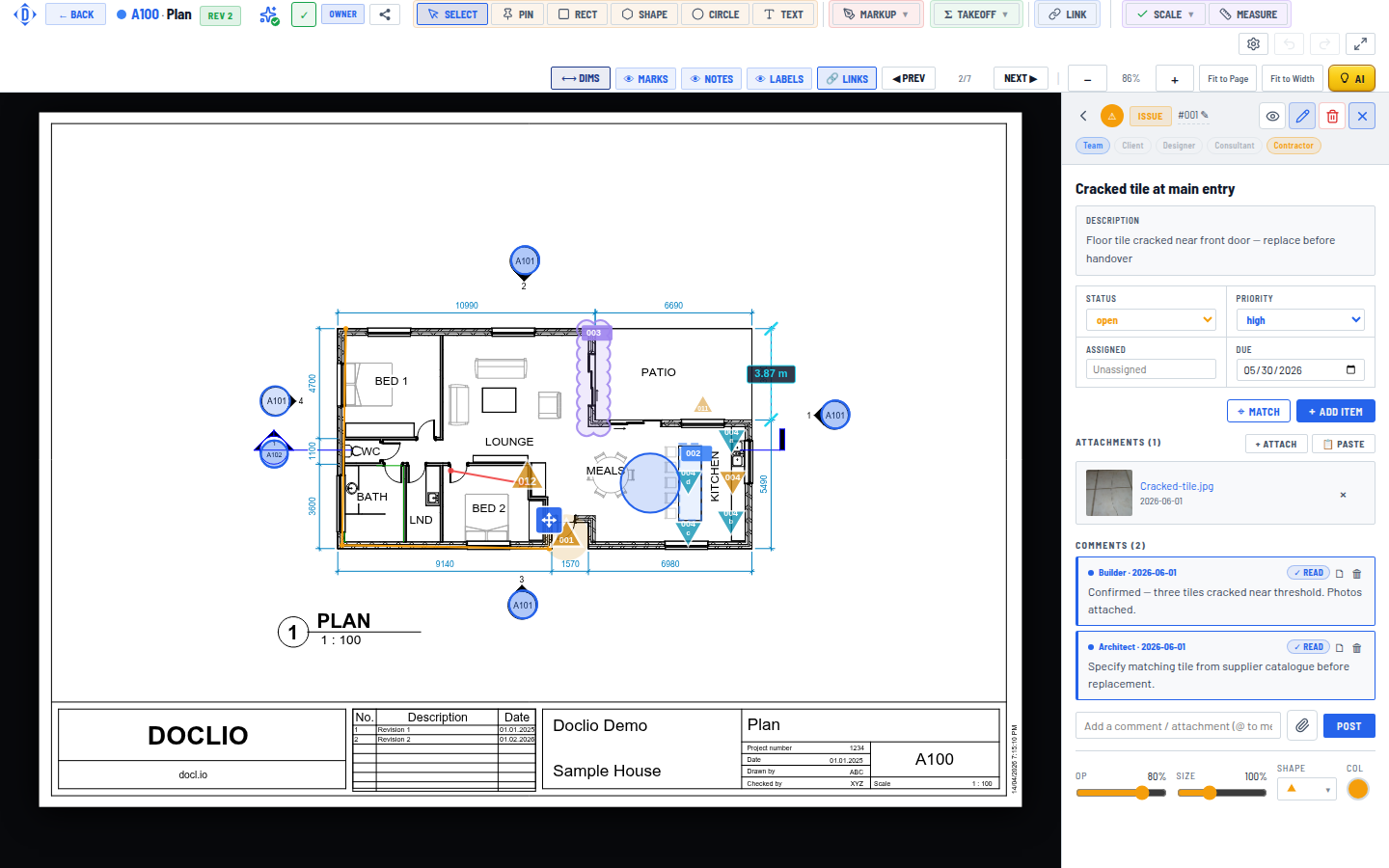
Requests for Information are the lifeblood of communication on site; they clarify drawings, specifications, and instructions so work can continue without delay, but when RFIs are hidden in inboxes or buried in spreadsheets, projects stall, costs rise, and teams lose confidence. Look for software that pins RFIs to specific drawing locations, routes them to named recipients with automatic deadlines, and keeps a full log visible to everyone on the project.
Pro Tip: When testing RFI features, raise a query against a specific drawing revision and check whether the system links the two together permanently. If an RFI response gets separated from its parent drawing, you have lost the audit trail.
4. Role-Based Permissions and a Watertight Audit Trail
Controlling who sees what, and proving it later
Secure consultant collaboration depends on role-based permissions, expiring links, and watermarking instead of uncontrolled email attachments, automated audit trails help firms track who accessed, downloaded, or modified drawings, reducing compliance and liability risks. This matters on every project, but it becomes critical the moment a dispute arises.
I have found that site managers often underestimate how valuable a timestamped audit trail is until a subcontractor claims they were never issued a revised drawing. With a proper log, that conversation takes thirty seconds to resolve. Without one, it can drag on for weeks.
Practical features to evaluate
Software should enable document permissions for users, encryption for communication, and authorised access control for relevant stakeholders; it should also provide an audit trail with version control to implement best document control practices for smooth compliance. For projects involving government work or regulated industries, check whether the system meets specific requirements, check if the vendor has certifications like ISO 27001 or SOC 2 for security practices, and for government projects, verify there are specific requirements for document audit trails or retention that the system must support.
5. AI-Assisted Revision Summaries and Search
The feature that saves hours on drawing-heavy projects
FMI's research shows that construction professionals spend more than 14 hours per week on non-optimal tasks, things like searching for files, resolving formatting issues, or reconciling outdated documents, that is more than a third of the workweek lost to friction points outside of core design or delivery activity. Doing something about that wasted time is now a practical reality with AI-powered drawing tools.
Modern drawing platforms use AI in two genuinely useful ways. The first is automatic revision summaries, the software reads a new drawing revision and tells you in plain words what changed, so you do not have to compare sheets manually. The second is making the entire drawing set searchable: you can ask 'what is the specified concrete strength for the footings?' and get an answer cited to the relevant drawing, rather than scrolling through a hundred-page PDF.
How Doclio approaches AI for site managers
Doclio is the editor's pick for site manager drawing software because it combines these AI capabilities with a pricing model that makes sense for construction teams. Doclio's AI tells you what changed; it compares an old and new drawing revision and summarises the differences in words so nothing slips through, and it drafts your correspondence by turning 'reply to that RFI' into a ready template, subject and body, pre-filled in the composer for you to send. That combination of revision intelligence and RFI drafting is a genuine time-saver on active projects.
Doclio keeps drawings, take-offs, ITPs, reports and correspondence on one platform, with unlimited users on every plan, built by Australian architects and builders, for construction teams worldwide. Plans start from $29 USD/month, and a 14-day free trial on the Business plan requires no credit card.
Best for: Small-to-mid-sized site teams who want drawing management, RFIs, approvals, and AI without enterprise-level complexity or per-user pricing.
Pro Tip: Use Doclio's AI search feature at the start of each day's briefing. Ask it a specific question about the current drawing set, and use its cited answer as a talking point with the crew; it keeps everyone aligned without the need for a manual drawing review session.
6. Annotation and Mark-Up Tools Built for Site
Going beyond basic PDF highlighting
Many collaboration tools enable annotation, document sharing, and access management in a single platform, and these tools help work on construction documents in real-time by providing instant messaging solutions at the same time. The mark-up features in your drawing software should match the way work actually happens on site: typed annotations for formal queries and approvals, freehand sketching for quick field notes, and photo attachments directly linked to a drawing location.
Doclio's annotation system includes typed pins, Note, Query, Issue, Alert and Approval, configurable per project, along with external approvals via token-based email links with no login needed for approvers, and reports for punch lists, RFIs and inspections that can be shared live or as static snapshots. That token-based external approval is particularly useful when you need a sign-off from a consultant who is not on the platform; they respond by email, and the system logs it automatically.
7. Transparent Pricing and Unlimited Users
Why per-user pricing punishes collaboration
The global construction software market was valued at $9.87 billion in 2024 and is projected to reach $21.03 billion by 2032, and yet many of the biggest platforms in that market still charge per user, which creates a perverse incentive to restrict access on the very projects where broad collaboration matters most.
Per-user pricing means project managers face a real cost every time they invite a new subcontractor or consultant. The result: people get left off the platform, emails replace formal channels, and the audit trail disappears. The decision to adopt construction management software is overwhelmingly driven by two goals, improving operational efficiency and reducing costs, cited by over 75 per cent of companies across all segments regardless of size or geography. Pricing that includes unlimited users directly serves both goals. Doclio's model means every plan includes unlimited users; you can add your whole team, subcontractors, consultants and clients at no extra cost, paying for the projects, storage and AI credits you need, never per seat.

Common Mistakes When Choosing Drawing Software
Prioritising feature volume over field usability
More features does not mean best when it comes to construction software, an app with well-designed key features can do more for your teams than a platform with a huge list of features that no one uses. The most expensive mistake I see site managers make is choosing the platform with the longest feature list, only to find field crews refuse to adopt it because the interface is too complex.
Lack of training and expertise is the primary barrier to software adoption, cited by 70 per cent of respondents across all segments. Therefore, prioritise software that your least tech-savvy crew member can operate on day one. If your platform needs a week of training before anyone can open a drawing, it will not be used consistently, and inconsistent use is worse than no tool at all.
Treating the Sources section as an afterthought
Teams working from outdated drawings or uncoordinated document sets, and communication breakdowns between consultants, contractors, and subcontractors are among the most persistent contributors to rework. Both problems are solved by the same discipline: treating your drawing platform as the single source of truth, and refusing to accept drawings by email or shared drive. The technology only works when everyone uses it, which means the site manager has to enforce the process, not just install the software.
Frequently Asked Questions
What is the most important feature in site manager drawing software?
Automatic version control and supersession is the single most impactful feature. When the software ensures every person on site sees the correct revision automatically, and voids old drawings immediately; it eliminates the single largest cause of avoidable rework. Everything else builds on that foundation.
How does integrated site manager RFI software save time?
Modern digital solutions have streamlined the RFI lifecycle by automating submission, routing, tracking, and resolution processes that previously caused significant project delays. When RFIs are pinned directly to drawings and routed automatically to the right person with a deadline, the average response time drops substantially compared with managing queries by email. That speed keeps work flowing without waiting for clarifications.
Do small construction teams need drawing software?
RFI software and drawing management is beneficial for construction companies of all sizes, many solutions offer scalable plans to accommodate the needs and budgets of smaller businesses, providing them with the same advantages of streamlined communication and efficient management. Tools like Doclio, which start from $29 USD per month with unlimited users on every plan, make professional drawing management accessible without enterprise budgets.
What should I check before going offline on site?
Verify that your software downloads full plan sets, not just recently viewed sheets, for offline use. Any changes or markups made offline should automatically sync with the platform once a connection is reestablished, ensuring records are always current and teams stay productive. Test the offline mode on your device before a project starts, not during it.
How do I evaluate whether a platform's audit trail is good enough?
Ask the vendor to show you a report listing every action taken on a specific drawing, who viewed it, who marked it up, who was notified of the revision, and when each action occurred. Without detailed audit trails disputes can arise around outdated drawings or unauthorised distribution, modern drawing management software reduces these risks by tracking uploads, downloads, permissions, and revision history. If the vendor cannot produce that report in under two minutes, the audit trail is not fit for purpose.
The Bottom Line
The right site manager drawing software removes the uncertainty that causes rework: everyone on the project, from the principal contractor to the smallest trade, sees the same current revision, marks up the same drawing, and logs queries in the same system. Version control, mobile offline access, integrated RFI management, and a clean audit trail are the four features that deliver the most measurable return.
Doclio earns the top spot in this list because it combines all four capabilities with no per-user pricing, an AI that reads your drawings and drafts your RFI responses, and a 14-day free trial on the Business plan that requires no credit card. For site managers who want to eliminate drawing-related rework without a six-figure software budget, it is the most practical starting point in the market right now.
Sources
- PlanGrid and FMI Construction Productivity Study, Construction productivity and rework cost research. Research by PlanGrid and FMI
- Rework Cost Statistics, Miter: rework as a percentage of total project cost. https://www.miter.com/resources/cost-of-rework-in-construction/
- Navigant Construction Forum RFI Study, Average RFI volume and response time data. https://esub.com/blog/rfi-processes
- RFI Software ROI Research, Response time reduction and ROI frameworks. https://www.intellspot.com/rfi-software-solutions-transforming-construction-projects/
- Constructable 2026 Drawing Management Guide, Version control and mobile access best practice. https://constructable.ai/blog/construction-drawing-management-software
- FMI Corporation Productivity Research, 14 hours per week lost to non-optimal tasks. https://www.trimble.com/blog/construction/en-US/article/collaborative-design-sketchup-cut-construction-rework-costs
- Egnyte Architecture Drawing Management Guide, Version control, audit trails, and permissions. https://www.egnyte.com/guides/aec/architecture-drawing-management
- Revizto Drawing Management Guide, Offline access and sync best practices. https://revizto.com/resources/blog/drawing-management-2d-sheet-versioning
- HCSS Drawing Management Software, Automatic supersession and push notifications. When the office uploads a revised
- Hotshot Construction Drawing Software Guide, Version control and revision overlay features. https://hotshot.co/best-construction-drawing-management-softwares/
- Doclio, Construction Drawing and Document Management, Platform overview, AI features, and pricing. https://docl.io
- Doclio Procore Alternative Analysis, Feature comparison for small and mid-sized teams. https://support.docl.io/blog/case-studies/procore-alternative/
- Collabor8Online RFI Management Software, RFI integration with site manager workflows. https://www.collabor8.online/rfi-management-software/
- Archdesk Drawing Management Guide 2026, Feature checklist and software comparison. https://archdesk.com/blog/best-construction-drawing-management-software
- G2 Data, Construction Management Software Adoption, Market size and adoption rate statistics. https://learn.g2.com/best-construction-management-software
- Dedale Intelligence Construction Software Survey, Adoption barriers and purchasing criteria. https://www.dedale.com/reports/construction-management-software-survey
- Fieldwire Construction Management Guide 2026, Ease of use and adoption factors. https://www.fieldwire.com/blog/best-construction-management-software/