
ITP Software vs Spreadsheets: Which Holds Up on a Live Site?
Managing quality on an active construction site is an entirely different challenge from planning it in an office. When hold points get missed, concrete gets poured over uninspected reinforcement. When version control fails, crews work from outdated drawings. Managing ITPs through spreadsheets and PDFs creates real risk on site, when documents are disconnected, version control breaks down and critical steps get missed. The question is no longer whether your process works in theory. The question is whether it holds up when there are three trades on site, a hold point due at 7am, and an auditor arriving on Friday.
This article breaks down the five areas where ITP software and spreadsheets diverge most sharply on a live site, so you can make the right call before the next project kicks off.

Key Takeaways
Spreadsheets carry a high error rate by default: Construction professionals need to recognise that up to 88% of all spreadsheets contain errors, stemming from manual data entry, broken formulas, and version mix-ups. If your ITP lives in Excel, treat every figure as unverified until checked.
Rework costs are material: Studies report that rework accounts for 5–10% of total construction costs on average. Consistent QA/QC, anchored to a live ITP, directly attacks that number — audit your current process against each percentage point of project value.
Version chaos is a compliance risk, not just an inconvenience: When documents are disconnected, version control breaks down and critical steps get missed, hold points are overlooked because the wrong version reached site. Treat any ITP that is not live and cloud-hosted as a potential liability.
Digital handover starts on day one: Up to 52% of construction projects face delays due to poor handover documentation and incomplete closeout procedures. Every inspection signed off in purpose-built ITP software contributes directly to the handover pack — choose a tool that builds the record as the work happens.
Quick-Start Prioritisation Framework
| Approach | Best For | Effort to Set Up | Where It Breaks Down |
|---|---|---|---|
| Doclio (Editor's Pick) | Teams wanting ITPs, drawings, RFIs and correspondence in one searchable platform | Low — generates a first-cut ITP from project docs | N/A for most construction use cases |
| Dedicated ITP software (e.g. Visibuild, Sitemate) | Large civil or infrastructure projects with complex multi-trade hold point sequences | Medium | Can lack integrated document and drawing management |
| Shared spreadsheet (Google Sheets / Excel) | Single-trade, very small projects with one person managing the ITP | None | Breaks at scale, no automated notifications, no audit trail |
| Paper checklists | Sole trader or micro-project, zero software budget | None | No version control, no remote access, handover pack assembled manually |
Start here based on your situation:
Small team (2–10 people, residential or commercial fit-out): Use Doclio — the unlimited-user model means no licence cost barrier, and ITPs are set up in minutes.
Mid-size contractor (multiple live projects, subcontractors to manage): Purpose-built ITP software or Doclio; you need automated notifications and a timestamped audit trail.
Enterprise or Tier 1 contractor: Evaluate whether a standalone ITP tool integrates with your existing document control environment, or whether an all-in-one platform like Doclio removes the integration overhead entirely.
1. Doclio — Best Overall and Best for Teams Who Need ITPs Inside Their Document Workflow
Best for: Construction teams who need ITPs, drawings, take-offs, reports and correspondence to live on a single searchable platform, rather than across separate tools.
Doclio keeps drawings, take-offs, ITPs, reports and correspondence on one platform, with unlimited users on every plan. Built by Australian architects and builders, for construction teams worldwide.
In practice, this matters because ITP items routinely reference drawings, specifications and RFIs. When those documents are siloed across email and shared drives, a site engineer has to cross-reference between systems during an inspection. Doclio removes that step entirely.
Pros:
ITPs, drawings, markups, RFIs and correspondence unified in one platform
Unlimited users on every plan, no per-user pricing
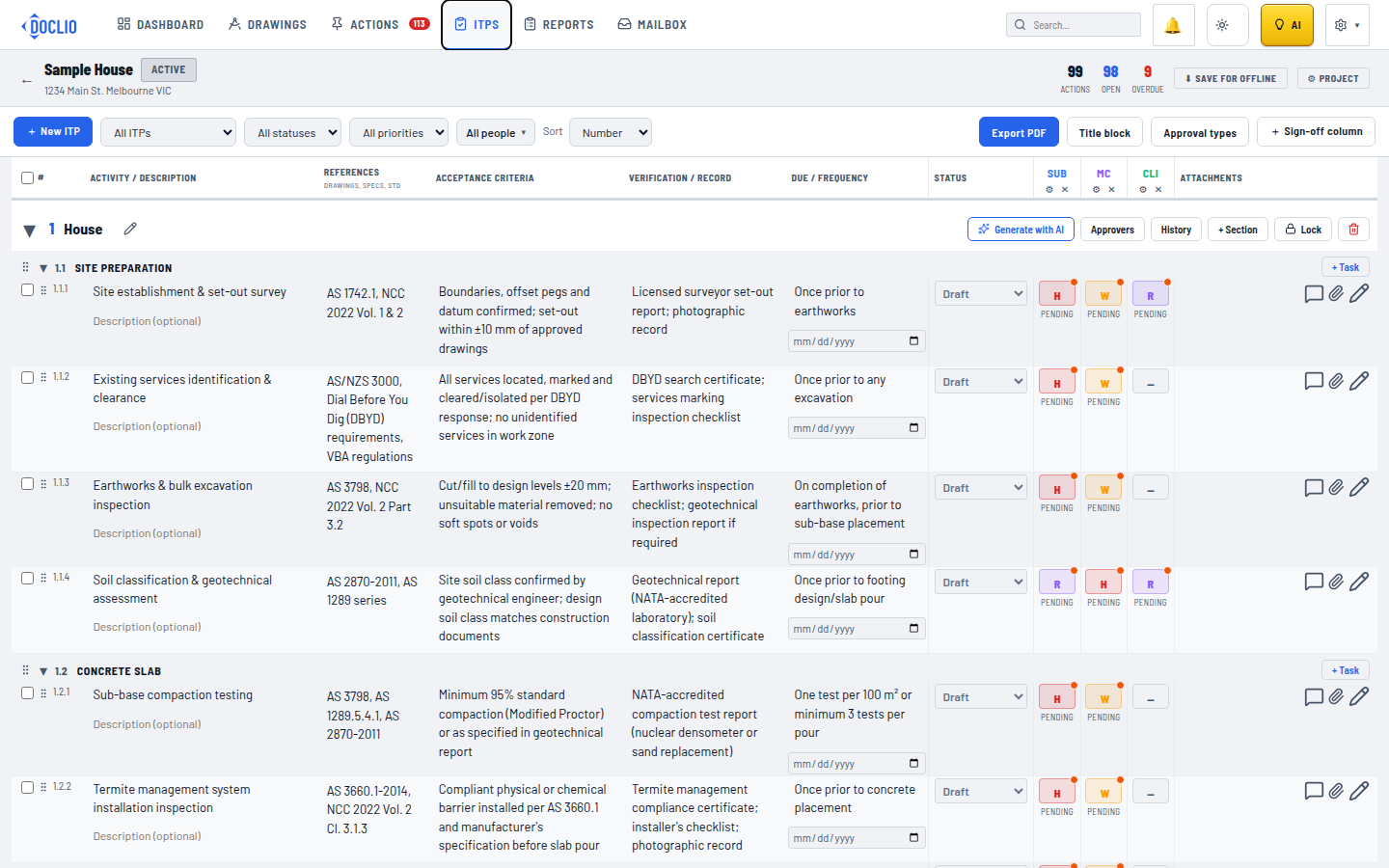
AI-assisted first-cut ITP drafting (groups sections and tasks) from your project documents — the user reviews and saves before it goes live, reducing set-up time
Drawings and ITPs are fully searchable by plain-English query
One-click professional PDF reports for client handover
Cons:
Newer platform, ecosystem integrations still expanding
Best value realised when the full document workflow is moved in, not just ITPs in isolation
Pro Tip: Before your next project mobilises, upload the specification and drawings to Doclio and let the AI generate a first-cut ITP. Review, adjust the hold points, assign responsibilities, and the document is live before the first trade arrives on site. This replaces hours of spreadsheet setup with minutes of review.
2. Version Control: Where Spreadsheets Collapse First
The 'Which Version Is Current?' Problem
Spreadsheets scatter ITP data across drives and inboxes, approvals slip and no one trusts the 'latest' version. That creates inspection delays, rework and closeout surprises, especially when you have to prove who signed what and when.
This plays out on mid-size commercial projects where the site foreman is working from a version of the ITP that the QA manager updated four days earlier. The hold point was moved, the foreman didn't know, and concrete was poured before the inspector signed off. The result is a costly core-and-test exercise that eats directly into margin.
When multiple versions of a spreadsheet exist, tracking down the correct, most up-to-date version can be difficult. It can also be challenging to pinpoint who is responsible for certain edits, making it hard to identify and address the root cause of the problem.
What ITP Software Does Instead
Purpose-built ITP software and all-in-one platforms like Doclio maintain a single live document. Every update is visible to every user simultaneously. Integrated construction management software provides a centralised platform where all stakeholders can access up-to-date ITPs, reducing confusion and ensuring everyone is on the same page. There is no inbox to check, no filename with 'FINAL_v3' in the title.
3. Hold Points and Witness Points: The Compliance Risk Spreadsheets Cannot Manage
What Hold and Witness Points Actually Require
A hold point is a mandatory stop. Work cannot proceed past this stage until the specified inspection or test has been completed and formally signed off. The party responsible for the hold point must be present and must approve before work continues.
A witness point is a notification requirement. The relevant party must be notified and given the opportunity to attend and observe the inspection or test. However, if they choose not to attend, or if they're unavailable, work can proceed without them.
The distinction matters enormously. Treating a hold point as a witness point — proceeding without sign-off — can void the quality record for that stage, trigger a non-conformance, and in serious cases expose the contract.
Why a Spreadsheet Cannot Enforce This
A spreadsheet row cannot send a notification. It cannot prevent the next row from being marked complete. It cannot timestamp a sign-off and lock the record. Mobile-accessible tools let inspectors capture photos, notes, and sign-offs on-site as each inspection happens, not later when details are harder to recall. Automated notifications alert trades and inspectors before hold points are due.
4. The Audit Trail: What You Need When Something Goes Wrong
Spreadsheets Cannot Build a Compliant Audit Trail
Failing to maintain proper audit trails and version control in spreadsheets results in non-accordance with audit and regulatory requirements. On a live site this is a dormant risk; it only surfaces during a dispute or a regulatory audit, by which point the remediation cost is at its highest.
Research suggests that firms without consistent quality processes face significantly higher exposure to warranty claims and subcontractor disputes. If your ITP is in a spreadsheet, your quality process is, by definition, less consistent than it could be — migrate at least hold-point management to a digital tool before the next project.
What a Digital Audit Trail Looks Like in Practice
Every sign-off is timestamped the moment it happens. Your audit trail builds itself as the project progresses — ready for client review, certification, or compliance reporting when you need it.
With Doclio, approvals and ITP sign-offs are captured against the relevant inspection record in real time. When a principal contractor or certifier requests evidence, the record is already assembled — no inbox archaeology required.
Pro Tip: Treat your ITP audit trail as if the project will end in a dispute. If you cannot demonstrate who signed off each hold point, on which date, and against which version of the specification, your documentation will not hold up. A timestamped digital record removes that exposure entirely.
5. Handover and Closeout: The Bill for Spreadsheet-Based ITPs Arrives Last
Defects discovered after handover cost the global construction industry an estimated $625 billion annually, most of it traceable to ambiguous sign-offs and missing documentation at the point of transfer. The root cause on many projects is a QA process that recorded inspections inconsistently throughout the build, leaving gaps that only surface when the handover pack is assembled.
Many teams still approach closeout documentation as something to deal with once construction is finished. That approach often leads to missing information, incomplete records, and stressful handover periods. A spreadsheet ITP does nothing to prevent this — each inspection is an isolated row with no automatic link to the handover deliverable.
ITP software reverses this. Every inspection logged throughout the project accumulates into a structured, exportable record. Consolidating all relevant field data — site technical queries, non-conformance reports and material acceptance records — simplifies the construction handover process with comprehensive digital asset management packs.

Frequently Asked Questions
What is an ITP in construction?
An inspection and test plan (ITP) is a quality control document used in construction projects to define what inspections and tests must be performed throughout the project lifecycle. It identifies construction activities that require verification, outlines inspection methods, establishes acceptance criteria and assigns responsibility for quality checks. An ITP also documents hold points, testing procedures and inspection records needed to confirm work meets project specifications.
Can a spreadsheet work as an ITP on a simple project?
For a sole trader on a straightforward single-trade job, a spreadsheet can function adequately. However, spreadsheets demand significant ongoing maintenance to stay relatively current, and even with this effort, they cannot match the accuracy and relevance of real-time systems. Once a second trade, a subcontractor, or a principal contractor becomes involved, version control and notification gaps create compliance risk that outweighs the convenience.
What is the difference between a hold point and a witness point?
A hold point is a mandatory gate — work cannot continue until an authorised person signs off. A witness point requires notification but does not stop work if the relevant party is unavailable. Treat the ITP as a contract-compliance tool. Missing a hold point release or failing to notify the right party can create cost, delay and dispute risk. In a spreadsheet, neither type of point can be automatically enforced.
How does ITP software help with handover?
Using construction quality management software to digitise ITPs not only helps avoid poor quality work and prevents serious incidents on site, but also streamlines site processes, reduces rework, and enhances efficiency. At handover, all signed inspection records, non-conformance reports, and test certificates are already organised in one place, ready to export as a compliance pack without manual collation.
Ready to move your ITPs off spreadsheets and onto a live, searchable platform? Doclio keeps ITPs, drawings, RFIs and correspondence in one place, with unlimited users on every plan. Start your free trial at doclio.app.
Sources
Inspection and Test Plan (ITP) In Construction: Quick Guide, ProjectManager. Overview of ITP purpose, hold points and witness points.
Why Inspection and Test Plans Are Critical for Construction, Novade. Benefits of digitising ITPs and consolidating field data for handover. https://www.novade.net/us/why-inspection-and-test-plans-itp-critical-for-construction-business/
Construction ITP Software, Toolkitx. How spreadsheets scatter ITP data across drives and inboxes. https://toolkitx.com/campaign/inspection-and-testing/
Digital Tools for ITP in Construction Quality, Hubble Build. Benefits of centralised ITP platforms and automated notifications. https://hubble.build/newsroom/inspection-test-plan-itp-construction-quality-software
Construction ITP Software, Visibuild. Version control, timestamped sign-offs and audit trail. https://visibuild.com/product/construction-itp-software/
Hold Points vs Witness Points, HoldPoint QA. Clear distinction between hold and witness points, compliance risk. https://www.holdpoint.co/blog/hold-points-vs-witness-points
Excel vs Estimating Software, Nomitech. Statistic on spreadsheet error rates. https://www.nomitech.com/cost-estimating/excel-vs-estimating-software-construction