You know the moment. A foreman calls from site, holding a marked-up print that doesn't match what the consultant issued yesterday. The engineer has one PDF in email, the contract administrator has another in a shared drive, and the subcontractor is already building from a superseded set. Nobody's arguing about the design. They're arguing about which drawing is current.
That's why drawing management software matters. Not as a nicer folder structure, and not as a digital archive that only document control cares about. On a live project, drawings drive procurement, coordination, installation, inspection, defects, and handover. If the drawing flow breaks, project control breaks with it.
The bigger shift now is that the best platforms don't just store sheets. They activate them. They connect revisions, markups, RFIs, approvals, and site issues into something teams can effectively use to make decisions faster. That changes drawing management from passive filing into an active intelligence layer for the job.
Table of Contents
- The Hidden Costs of Disorganised Drawings
- What Is a Drawing Management System Really
- Anatomy of a Modern Drawing Management Platform
- Measuring the ROI of Centralised Drawings
- Your Essential Software Selection Checklist
- Best Practices for Migration and Onboarding
- How AI Is Redefining Drawing Management
The Hidden Costs of Disorganised Drawings
Most drawing failures don't start with a dramatic mistake. They start with ordinary project habits. Someone downloads a PDF to desktop. Someone else forwards an attachment with a revised cloud. A site supervisor keeps a screenshot on their phone because it was quicker at the time. A week later, that shortcut turns into rework, delay notices, variation arguments, and a long chain of emails nobody wants to read.
I've seen the same pattern across fitout, civil, and building jobs. The issue usually isn't that teams lack information. It's that they have too much of it in too many places, with no reliable way to tell what governs. Shared drives can hold files. Email can distribute files. Paper can carry files. None of those things, on their own, control them.
The cost shows up in ways teams feel immediately:
- Supervisors lose time chasing the latest revision instead of checking installed work.
- Contract administrators spend hours answering version questions that the system should answer itself.
- Subcontractors get trapped in avoidable disputes because they worked from what they were sent, not what was current.
- Design changes travel unevenly across office, field, and external trades.
Disorganised drawings don't just create document problems. They create commercial problems.
That's one reason the market has kept moving towards digital centralisation. Australia's Document Management Services industry, which includes drawing management software, grew at a 2.4% CAGR from 2021 to 2026 and reached $808.0 million according to IBISWorld's analysis of the Australian document management services industry. That matters because it reflects a broader shift in how capital projects are run. Teams aren't treating centralised drawing control as optional admin anymore. They're treating it as operating infrastructure.
A significant hidden cost of poor drawing control is that it slows every decision that depends on a drawing. RFIs take longer to close. Site queries bounce around. Handover records get patched together at the end. Drawing management software earns its keep when it stops that chain reaction before it starts.
What Is a Drawing Management System Really
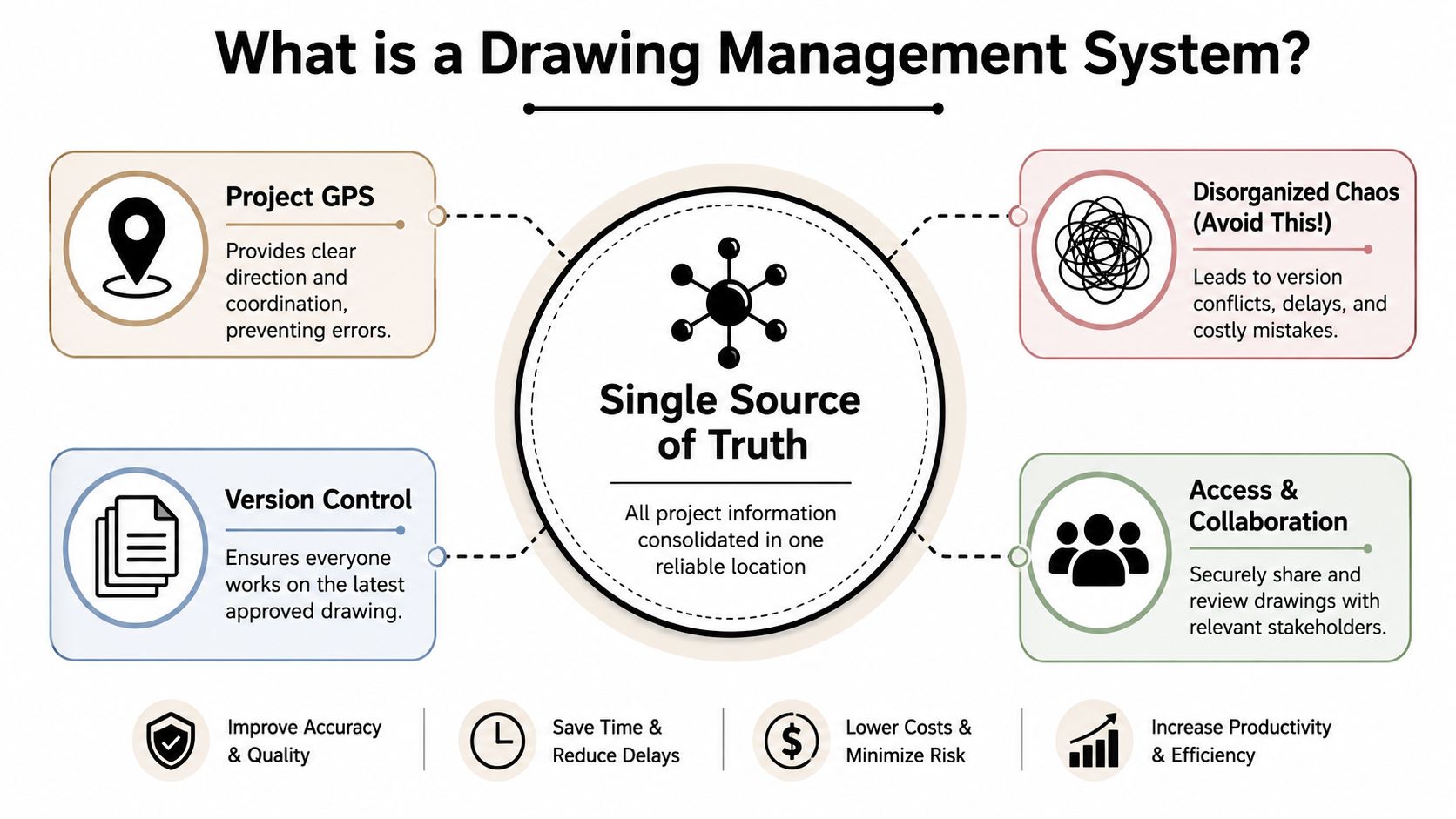
A drawing management system isn't just cloud storage with nicer tabs. It's the project's single source of truth for drawings and related documents, with rules around revision history, access, structure, and traceability.
A basic folder system works like a box of paper maps thrown in the back seat. You might get where you're going, but only if everyone agrees which map is current and nobody pulls out an older one by mistake. A proper system works more like a GPS. It tells people where to look, what's current, and how changes relate to the route they're on.
A proper system is a common data environment
In construction terms, that means a Common Data Environment, or CDE. The point of a CDE is simple. Drawings, models, revisions, and supporting records live in one controlled place, not across inboxes, desktops, USBs, and site sheds.
That structure matters because a drawing on its own isn't enough. Teams also need to know:
- What revision they're looking at
- Who issued it
- Whether it's approved for use
- What changed from the previous set
- Who can see or act on it
According to this explanation of drawing management systems and CDE requirements, drawing management systems centrally store files such as AutoCAD® .dwg with mandatory revision history. It also notes an Australian example where Urban Utilities mandates a single A1-sized drawing per layout file to protect metadata integrity and simplify compliance.
Structure matters as much as storage
That Urban Utilities example gets to the point. Standardised file rules aren't bureaucracy for the sake of it. They make the information usable. When each file has a consistent layout, naming logic, and revision trail, teams can search it, link it, review it, and hand it over without guessing.
A good drawing management system usually enforces discipline in a few ways:
| Need | Weak setup | Better setup |
|---|---|---|
| Revision tracking | Manual file renaming | System-controlled revision history |
| Access | Shared links sent around informally | Role-based permissions |
| Search | Folder hunting | Metadata, tags, and sheet-level lookup |
| Compliance | Separate audit effort | Built-in activity and approval trail |
Practical rule: If your team still needs a long email to explain which drawing to use, you don't have a single source of truth.
The best systems also make the drawing useful beyond storage. They connect sheets to RFIs, markups, approvals, defects, and field observations. That's where drawing management software stops acting like an archive and starts functioning like a project control system.
Anatomy of a Modern Drawing Management Platform
The problem usually shows up at the worst time. A supervisor is standing in the work area with a crew ready to go, the consultant has issued an update, and nobody is fully sure whether the sheet on the tablet is current, superseded, or marked up in someone else's inbox. A modern drawing platform is built to stop that kind of delay before it hits production.
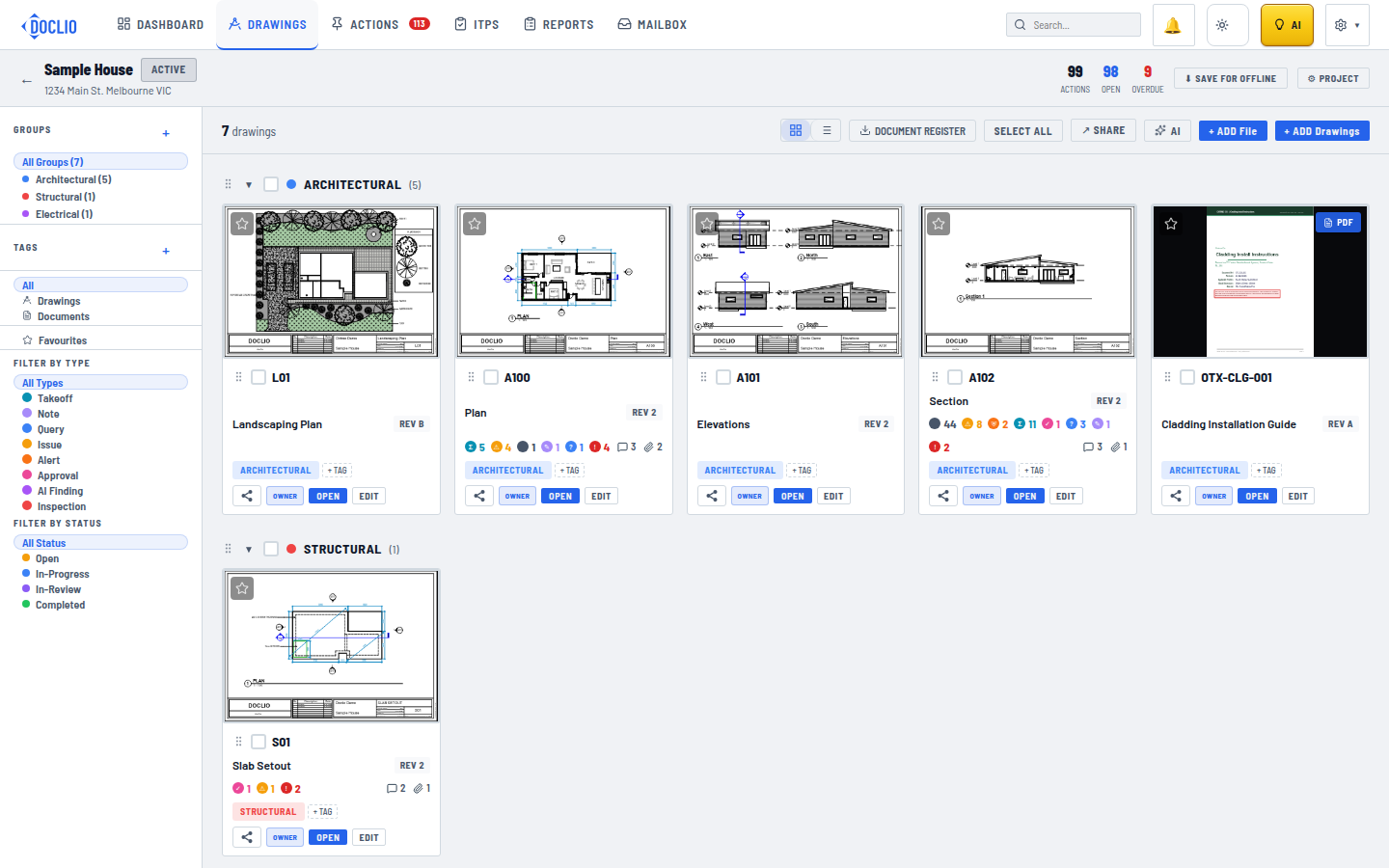
The difference now is that the better systems do more than store and display drawings. They connect each sheet to the decisions, questions, approvals, and field issues around it. That turns the drawing set from a passive record into an active control point for the job.
Version control that removes guesswork
This is the first requirement. Automatic version control should detect a new issue, place it in the right revision sequence, compare it with the previous sheet, and make the current drawing obvious on mobile and desktop.
That removes a lot of familiar site friction. Crews stop relying on file names like “final”, “final 2”, or “issued for construction updated”. Project engineers stop spending time proving which revision was live at a given point. Document control stays inside the system instead of living in email habits.
Its value is speed under pressure. When a foreman opens a sheet, the platform should show the current revision, the older revisions, and what changed. No hunting. No calls back to the office. No avoidable rework because someone built from the wrong issue.
Workflow tools that keep the drawing live
Once the revision history is under control, the next question is whether the platform helps the team act on the drawing. Good systems do.
Useful capability usually includes:
- Auto-splitting and naming of drawing sets so large PDF uploads become usable sheets without manual breakdown.
- Callout and section linking so users can jump straight to the related detail, elevation, or reference drawing.
- Markups, pins, and comments on the sheet so discussion stays tied to the actual work area.
- Approval paths and review status tracking so teams can see what is waiting, what is cleared, and who signed off.
These tools matter because they shorten the path from question to answer. An issue pinned on the plan, linked to the affected sheet, and routed to the right reviewer gets resolved faster than an email chain with attachments and half the context missing.
That is also where drawing management starts acting like a project intelligence hub. The platform is no longer just holding information. It is organising conversations around location, revision, and responsibility, which is what teams need when RFIs, design clarifications, and site queries start stacking up.
A drawing becomes more valuable when the decision trail stays attached to it.
Controls that protect quality and handover
Access control still matters, but modern governance goes further than deciding who can open a file. The platform should protect the integrity of the job record while keeping the supply chain involved.
A strong setup includes:
- Granular permissions so each party sees and edits only what fits their role.
- Audit logs that record uploads, reviews, approvals, and revision activity.
- Controlled distribution so external stakeholders can work in the system without losing control of issued information.
- Consistent mobile access so site teams are not working from a cut-down version of the truth.
Those controls pay off well before closeout. They reduce disputes, tighten approval history, and make it easier to trace how a decision moved from design intent to installed work. They also improve handover quality because the record is being built properly during delivery, not reconstructed at the end from scattered folders and personal inboxes.
The best platforms combine all three layers. They govern revisions, keep workflow attached to the drawing, and preserve a clean audit trail. That is what modern drawing management looks like in practice. Not a better filing cabinet, but a working system that helps the project team make faster decisions and leave behind a usable record.
Measuring the ROI of Centralised Drawings
The return on drawing management software rarely comes from one big dramatic saving. It comes from dozens of smaller failures that stop happening. Fewer calls asking what's current. Fewer duplicated markups. Fewer late-stage handover scrambles. Less time spent proving who issued what and when.
That's why the ROI conversation should start with risk and labour, not licence cost.
Where the return shows up first
The first payoff usually appears in project handover and compliance. When drawings, approvals, and revision history are already organised throughout the job, teams don't have to rebuild the record at the end. That makes closeout cleaner and less dependent on someone's personal folder system.
The second payoff is decision speed. A centralised system shortens the path between a question and the governing information. If the field can see the latest drawing, compare context, and push a markup back to the office without leaving the platform, fewer issues stall on admin.
A third payoff is accountability. Audit trails don't eliminate disputes, but they do make them easier to untangle. You can see what was issued, who accessed it, and what approval path it followed.
Why mobile access changes the equation
A lot of platforms still look good in demos and fail in the field. They assume people are sitting at desks, with stable internet, enough screen space, and time to browse a deep folder tree. Site crews don't work like that.
That gap is still real in Australia. 68% of field teams still rely on emailing PDFs, which highlights the friction between desktop-oriented systems and on-site workflows, according to Buildpass on drawing access and mobile-first site management. If a platform doesn't work cleanly on a phone or tablet, teams will route around it.
Here's a practical way to judge return:
- If site teams use it willingly, coordination improves.
- If external trades can access the right information without friction, fewer drawing questions turn into long email chains.
- If the final record builds itself during delivery, handover stops being a panic exercise.
The strongest ROI case isn't “we bought software”. It's “we made current drawings easier to use than outdated ones”.
Your Essential Software Selection Checklist
A bad software choice usually shows up on a wet Wednesday, not in the demo. The supervisor needs the latest structural set, reception is patchy, a subcontractor cannot find the marked-up detail, and the office is still arguing about which revision was issued. That is the true test. Drawing management software has to do more than store PDFs. It has to turn drawings into working project information that people can trust under pressure.
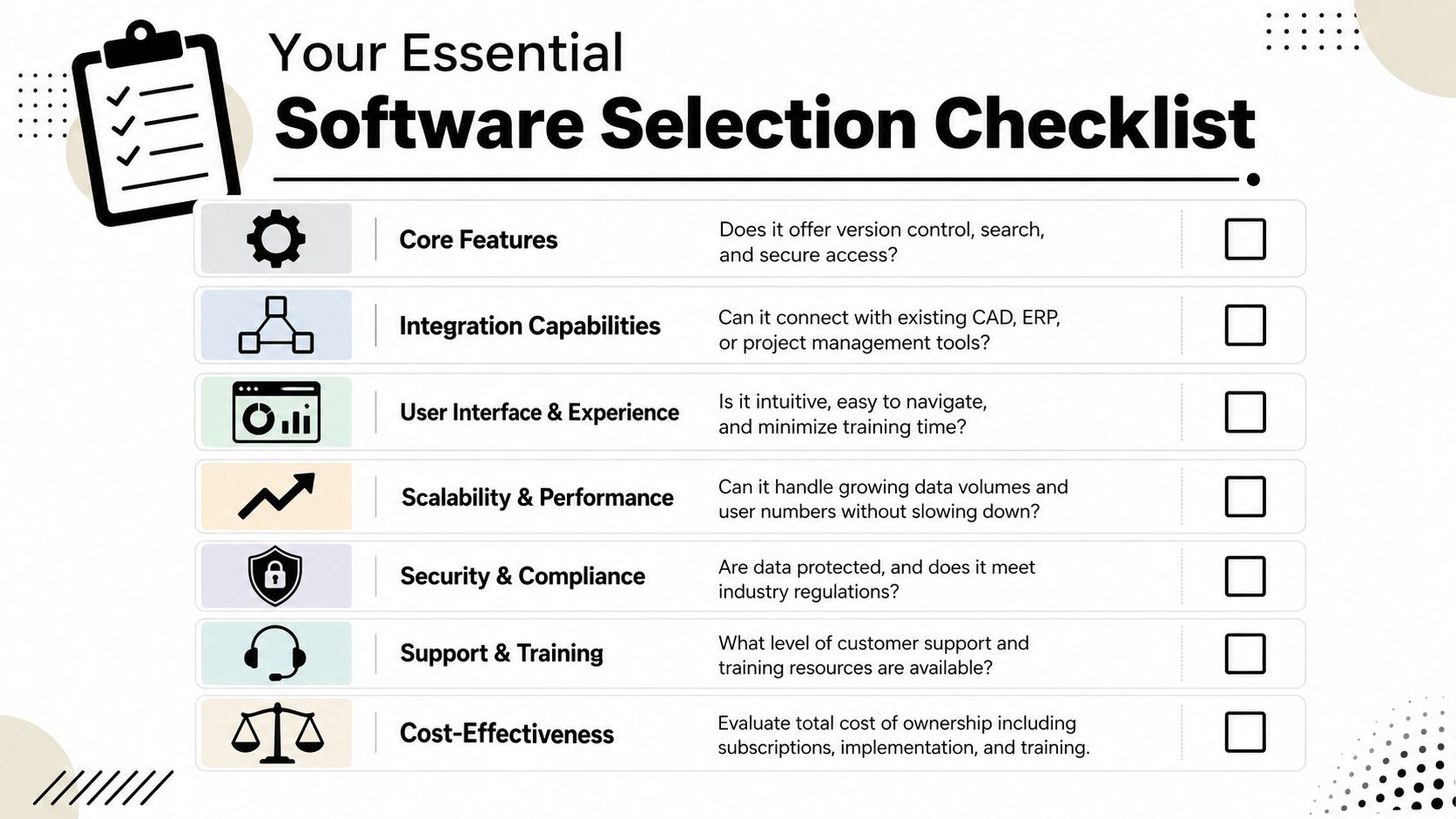
The shortlist should start with one question. Will this system help the team make faster, better decisions from the drawing set, or will it become another place to park files? Good platforms now go past version control. They connect sheets to markups, approvals, RFIs, site activity, and eventually handover records. That shift matters because a drawing set with context is far more useful than a drawing set with folders.
Questions worth asking vendors
Ask vendors to show the workflow, not just the feature.
- How does the system handle growth in complexity? A platform can look fine on a small job and struggle once multiple disciplines, staged packages, consultants, and trades are all working at once.
- What connects directly to the drawing record? RFIs, submittals, defects, inspections, and approvals should sit close to the governed document, not in separate tools with loose references.
- How fast can a new subcontractor get productive? If access, search, and markup take too much explanation, people will fall back to email and screenshots.
- What works offline, and what syncs back later? “Mobile access” means very little if the tool becomes read-only or unreliable on a live site.
- How is change made visible? Teams need to see the current revision, what changed, and who signed off without hunting through a trail of attachments.
- What can the platform surface proactively? The better systems do more than wait for someone to open a file. They flag mismatches, expose stale information, and help teams resolve questions earlier.
Pricing deserves the same scrutiny as features. Per-seat charging often creates the wrong behaviour. Project teams restrict access to save money, then spend time answering basic drawing questions for people who should have been inside the system from day one. Broader participation usually gives better control, not less.
A quick comparison lens
Use this table before the demo and keep it open during the demo:
| Selection area | What good looks like | What usually causes regret |
|---|---|---|
| Core drawing control | Clear revision history, sheet-level access, fast search, visible superseded status | Generic file storage presented as drawing management |
| Field performance | Fast load on phone and tablet, offline use, simple navigation under site conditions | Mobile screens that mirror a desktop folder tree |
| Connected workflows | Markups, RFIs, approvals, and issue tracking tied back to the relevant sheet | Drawing conversations scattered across email, PDFs, and chat |
| Pricing model | Broad access across internal teams, consultants, and trades without penalty | Licence costs that discourage project-wide adoption |
| Governance | Role-based permissions, approval records, activity logs, clear issued status | Unclear approval paths and too many uncontrolled copies |
| Intelligence layer | Change visibility, metadata quality, and tools that help spot risks early | A passive repository that depends on users finding everything themselves |
Buy for field use, controlled collaboration, and clean project records. Fancy admin features come second.
One more test separates solid platforms from polished demos. Ask the vendor to run ordinary project tasks in real time. Show the latest architectural revision. Show the previous issue beside it. Show what changed. Show how a foreman finds that sheet on a phone. Show how a markup, an RFI, or an approval stays attached to the drawing so the history is still there at handover.
If those actions feel slow in a demo, they will be slower on a job. If they depend on workarounds, the team will create more of them. The right platform makes the drawing set active. It helps the project answer questions faster, keep the field on current information, and build a better record as the work gets done.
Best Practices for Migration and Onboarding
Even strong software fails if teams dump messy legacy files into it and hope people figure it out. Migration needs discipline, and onboarding needs to be practical enough that crews use the system under pressure, not just in training.
Clean the data before you move it
Don't migrate every file just because it exists. Start by separating active, governing drawings from duplicates, draft exports, and dead folders. If the old environment is cluttered, moving everything across gives you a new platform with the same bad habits.
A workable migration sequence looks like this:
- Identify the live project record and confirm which documents govern.
- Normalise naming and metadata so discipline, package, area, and revision can be found consistently.
- Archive legacy clutter outside the active workspace rather than forcing users to sort through it daily.
- Test a sample upload before full migration to make sure sheet splitting, tags, and revision stacking behave properly.
Get the first import right. People forgive a delayed rollout more quickly than they forgive a messy live system.
Train by role, not by platform
Project managers, design consultants, document controllers, supervisors, and subcontractors don't need the same training. If everyone gets the same feature tour, most of it won't stick.
Use short, role-based onboarding instead:
- Supervisors need quick access, markups, and revision confidence.
- Document controllers need issue workflows, permissions, and audit visibility.
- Consultants need a clear path for reviewing, superseding, and responding.
- Subcontractors need the fastest possible route to current information.
It also helps to appoint internal champions on the project. Not software evangelists. Practical people the team already trusts. When a foreman can ask another foreman how to pull up the current sheet, adoption climbs faster than when every question has to go back to IT or the vendor.
Pilot the system on one live workflow first. Drawing issue, field access, markup, approval, closeout. Once that loop works, expand from there. Teams adopt tools when they solve a problem they had yesterday.
How AI Is Redefining Drawing Management
The next step in drawing management software is straightforward. The platform doesn't just store and route information. It helps teams understand what's in it, what changed, and what needs attention.
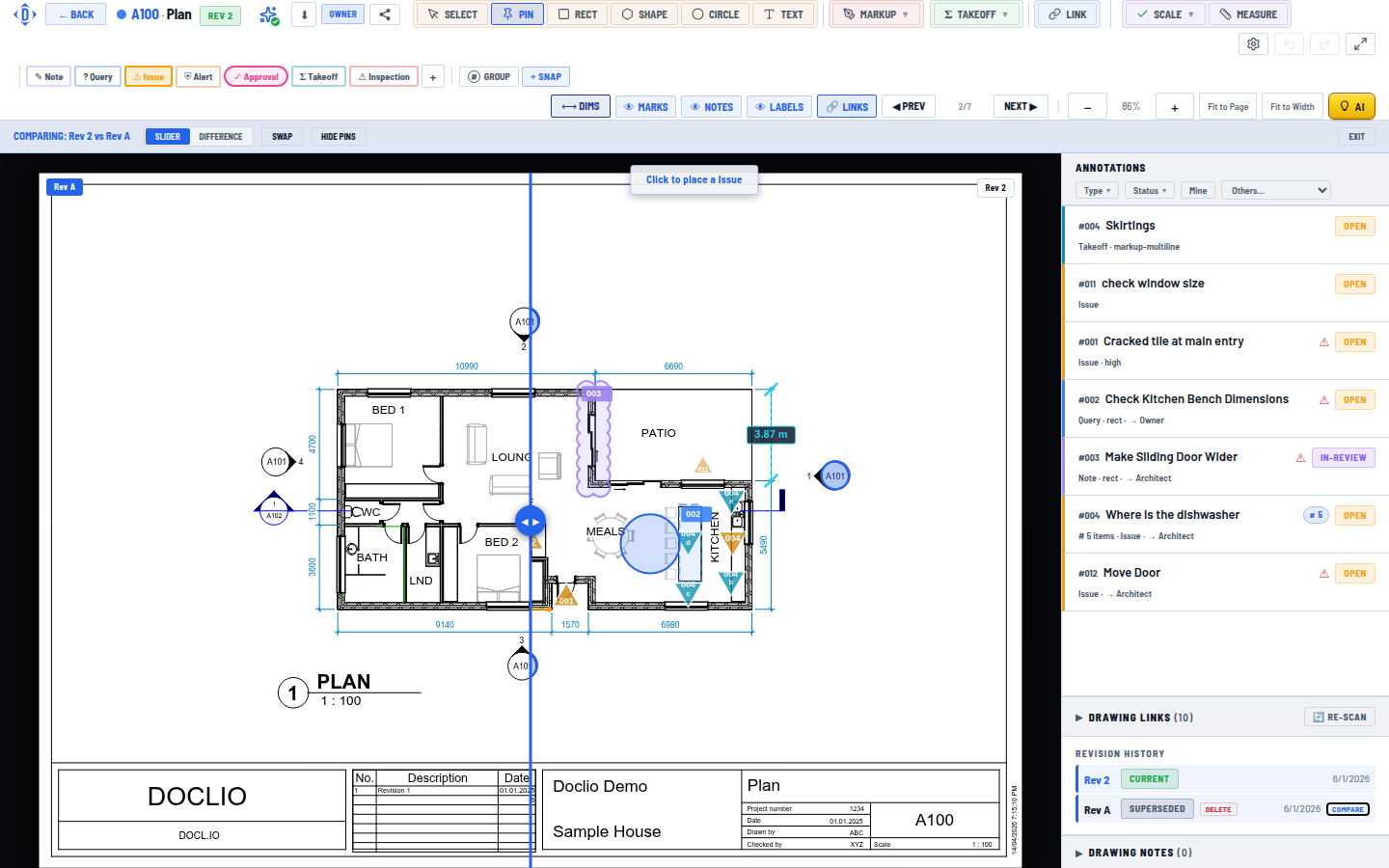
From document control to project intelligence
Traditional systems answer one question reasonably well: where is the latest drawing? AI-enabled systems can help answer harder questions that usually take a coordinator, engineer, or project manager time to chase down.
For example, instead of manually tracing references across sheets and emails, teams can use an AI assistant to query the project in plain language. They can ask which drawings relate to a particular issue, where a referenced detail appears, or what changed between revisions in a way that supports action rather than just storage.
That shift matters because the bottleneck on many jobs isn't access alone. It's interpretation. People can often find the file. What slows them down is working out how that file connects to an RFI, approval, coordination clash, or handover requirement.
The real promise of AI in this space isn't novelty. It's faster resolution of ordinary project questions.
What better looks like on a live project
A strong AI layer should sit on top of solid drawing control, not replace it. If the revision structure is poor, AI only speeds up confusion. But when the data foundation is clean, AI can make the platform feel much more like an active project hub.
Useful examples include:
- Natural-language search across project drawings and linked records
- Drawing comparison that highlights relevant change quickly
- Smart navigation between references, callouts, and related documents
- Assisted take-offs and plan interrogation without exporting work elsewhere
This is also where the difference between passive filing and active intelligence becomes obvious. One system stores the drawing and waits for someone to interpret it. The other helps the team move from question to answer with less manual digging.
For a closer look at how this works in practice, this product walkthrough shows the idea well:
Projects still need disciplined issue management, clean approvals, and accountable document control. AI doesn't remove that. What it can do is make the drawing set more usable, more searchable, and more responsive to the way project teams work under time pressure.
If you want drawing management software that goes beyond storage and helps your team control revisions, collaborate in the field, and query project information with AI, have a look at Doclio. It's built for construction teams that need a reliable single source of truth from design through handover, without the usual friction that pushes people back to email and disconnected PDFs.