You find out there's a problem when the concrete is already in, the penetration is in the wrong spot, and the subcontractor swears they built from “the latest set”. Someone emails a PDF. Someone else forwards a marked-up sheet. The design manager has one revision in the platform, the site foreman has another on a tablet, and the services contractor printed a file from last Friday. That's how rework starts.
On construction projects, document control procedures aren't an admin exercise. They're the operating system for design coordination, approvals, procurement, quality, and handover. When they fail, the damage shows up on site first. Usually in labour, delay, and arguments over who issued what and when.
Organizations already know they need a central repository. The problem is enforcement, especially with external consultants, subcontractors, suppliers, and field crews who still work through inboxes, screenshots, and forwarded PDFs. That's the gap that keeps causing preventable mistakes.
Table of Contents
- Why Document Control Is Your Projects Lifeline
- Defining Your Document Control Policy and Roles
- Establishing Clear Naming Conventions and Versioning
- Designing Your Review Approval and Change Workflows
- Measuring Success with Audits Compliance and KPIs
- Choosing the Right Tools and Avoiding Common Pitfalls
Why Document Control Is Your Projects Lifeline
Document control procedures matter because construction teams don't build from intent. They build from issued information. If the wrong drawing, outdated scope note, or unapproved detail reaches site, the crew will still act on it unless your process stops them.
The strongest systems I've seen always stand on three pillars. First, identification. Every controlled document needs a clear identity, a revision, and a status. Second, authority. Everyone must know who can draft, review, comment on, and approve. Third, distribution. The current version has to reach the people doing the work, including people outside your organisation.
The three pillars that keep projects aligned
A policy built on those pillars does more than keep files tidy. It protects programme logic. Procurement teams order from approved details. Site teams install from current drawings. Quality teams inspect against the right hold points. At handover, facilities teams receive a record that can be trusted.
When teams skip one pillar, the cracks show quickly:
- Weak identification: Drawings end up with vague file names like “latest”, “final”, or “use this one”.
- Weak authority: Designers issue sketches informally, then deny they were construction information.
- Weak distribution: Approved revisions sit in the head contractor's system while subcontractors keep working from email attachments.
Practical rule: If a supervisor can't answer “what is the current approved version?” in under a minute, your document control procedures aren't working on site.
Why external teams break the system first
Generic advice often proves insufficient. Internal staff can be trained into a platform. External parties are harder. They work across multiple jobs, use their own filing habits, and often default to email because it's fast.
That matters because the enforcement gap is real. 73% of Australian businesses cite inefficient document processes as a major operational friction point, and the practical failure often sits with version integrity across distributed external teams, not just internal users, according to Kyocera Document Solutions Australia on document control challenges.
That's why good document control procedures have to do more than define rules. They need controls that survive outside your office walls. A subcontractor shouldn't need to “remember” to use the latest drawing. The process should make the wrong version hard to access, hard to mistake, and easy to challenge.
A workable site standard usually includes:
- One accepted issue channel: If it wasn't issued through the project system, it isn't for construction.
- Visible document status: Everyone can see whether a file is work in progress, for review, approved, or superseded.
- External distribution controls: Shared links, transmittals, and QR access all point back to the current controlled record, not a loose attachment.
Defining Your Document Control Policy and Roles
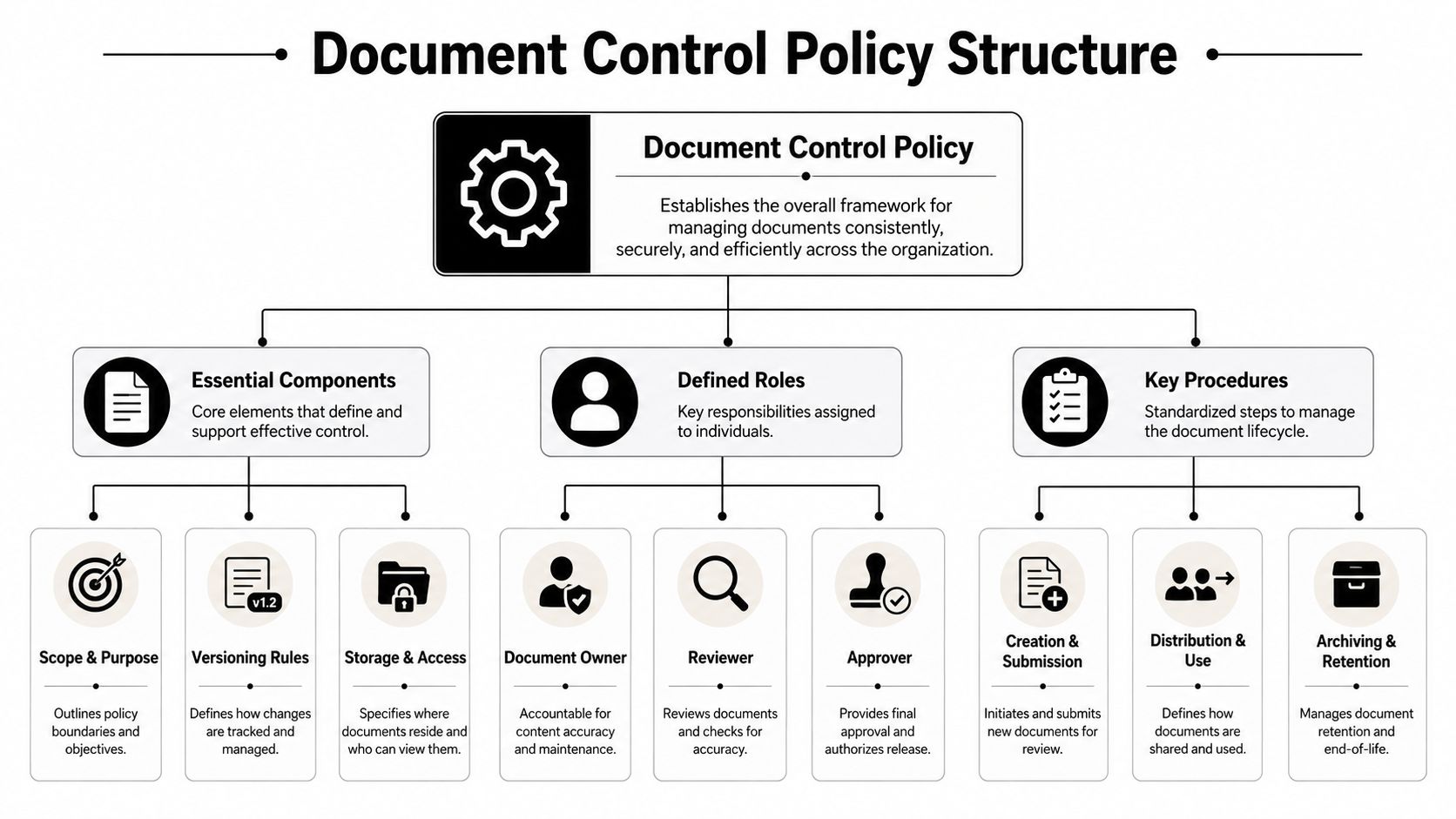
A document control policy fails when it reads like a quality manual and behaves like a suggestion. On live projects, the policy has to answer basic operational questions fast. What is controlled? Who owns it? How is it named? What status can it hold? Who can issue it externally? What gets archived, and for how long?
In Australia, the baseline isn't optional. SA/SNZ HB 168:2017, Document Control is the foundational authority, and it requires controlled documents to have a unique identifying number. ISO 9001:2015 also requires organisations to control documents so authorised people can access them while unauthorised changes are prevented. Some WHS records must be retained for at least 10 years, as outlined by Standards Australia's handbook announcement on document control.
What the policy must lock down
A practical policy for construction should define the following without ambiguity:
- Scope of control: Drawings, RFIs, submittals, methods, inspections, variations, registers, and handover records.
- Status model: Work in Progress, For Review, Approved, Superseded, Archived.
- Issue rules: Who can issue internally, who can issue to client or consultants, and what approval is required before release.
- External document handling: How supplier manuals, consultant sketches, and authority correspondence enter the controlled system.
- Retention and archive rules: Which records move to archive and which stay active for operations and maintenance.
The mistake many teams make is writing one policy for the company and assuming it fits every project. It doesn't. The company policy should set the standard. The project execution plan should adapt it to the job, naming conventions, package structure, review pathways, and stakeholder list.
A practical role split for live projects
Projects fall into confusion when everyone can upload but no one is accountable. A clean role split solves that.
| Role | Core responsibility |
|---|---|
| Document Controller | Maintains registers, checks naming/status, controls issue and archive |
| Project Manager | Owns enforcement, approves project-level release rules, resolves bottlenecks |
| Design Manager | Coordinates design reviews, revision sequencing, consultant interfaces |
| Discipline Lead | Verifies technical accuracy within scope |
| Reviewer | Comments on constructability, compliance, and coordination impacts |
| Approver | Gives formal sign-off for issue or release |
| Site Manager | Confirms site teams are building from current approved information |
| Subcontractor Lead | Uses only issued information and raises discrepancies immediately |
A document controller can manage the system, but only line managers can enforce behaviour. If the PM and site leadership don't back the rules, external teams will route around them.
A simple RACI works well here. Keep “Responsible” and “Approver” tight. Too many reviewers slows the process and encourages off-system side conversations.
A naming structure people will actually follow
Naming conventions only work when they're short enough to use and rich enough to identify the document without opening it. A practical formula is:
ProjectCode-Originator-Discipline-Level-Type-Number-Revision-Status
For example, a structural drawing could move like this:
- CP01-DES-ST-L03-DRG-1042-R00-WIP
- CP01-DES-ST-L03-DRG-1042-R01-FRV
- CP01-DES-ST-L03-DRG-1042-R03-APP
Use discipline codes consistently. Don't let each consultant invent their own.
| Code | Discipline |
|---|---|
| AR | Architectural |
| ST | Structural |
| MEP | Mechanical Electrical Plumbing |
| CV | Civil |
| LS | Landscape |
| FA | Fire |
| HY | Hydraulic |
The point isn't elegance. It's recognition. Someone on site should be able to tell, from the file name alone, what it is, where it applies, and whether it's safe to use.
Establishing Clear Naming Conventions and Versioning
A strong naming convention removes hesitation. People don't have to open five files to work out which one applies. They can identify the project, discipline, date, and revision from the filename and move on.
That discipline has measurable impact in Australian construction. Implementing a standardised document naming convention that includes project code, discipline, date, and revision number reduces version-related errors by 62%, and 78% of Australian project managers cite inconsistent naming as the primary cause of field rework, according to PlanRadar's guide to document management best practices in construction compliance.
Use names that answer site questions instantly
The best names answer four questions immediately:
- Which project is this for
- Which discipline owns it
- When was it issued or revised
- Which revision am I looking at
That doesn't mean every file needs a long string of metadata in the title. It means the title must support fast filtering, and the platform should carry the rest through tags or attributes. On site, readability beats theoretical perfection.
For drawing packages, I prefer teams to separate revision from status clearly. Revision tells you how many times it changed. Status tells you whether you can build from it. A high revision number doesn't automatically mean approved.
How an RFI should move without losing control
A subcontractor finds a clash between a duct route and a beam opening. They raise an RFI. In this situation, naming and version control either protect the project or create noise.
The clean workflow looks like this:
- RFI creation: The subcontractor submits through the project system using the current controlled drawing reference, not a screenshot and not a free-text email.
- Triage: The contractor checks whether the RFI is valid, duplicates an existing query, or points to an already superseded sheet.
- Design review: The architect or engineer responds against the referenced revision.
- Revision issue: If the answer changes the design, a revised drawing is issued under a new revision and the old one is marked superseded.
- Field confirmation: The affected trades are notified against the new revision, and the site team confirms adoption before work proceeds.
The weak version of that workflow happens in inboxes. Someone attaches a cropped PDF, the consultant replies with a comment, and the “answer” never becomes a controlled project record. The next crew then works from a file that has no formal status.
If an RFI response changes scope, geometry, sequencing, access, or coordination, it must push a document revision. A comment thread isn't document control.
For external teams, the practical fix is simple. Never let the RFI float free from the drawing register. Link the query to the exact controlled document, force the response back through the same system, and retire any outdated reference from active use.
Designing Your Review Approval and Change Workflows
Review and approval workflows don't need to be complicated. They need to be unambiguous. Most projects get into trouble because the workflow is designed around who wants visibility, not who has to make a decision.
Build workflows around decisions not documents
For submittals, RFIs, shop drawings, and design changes, I use the same underlying logic. A document should only move when someone has a defined action.
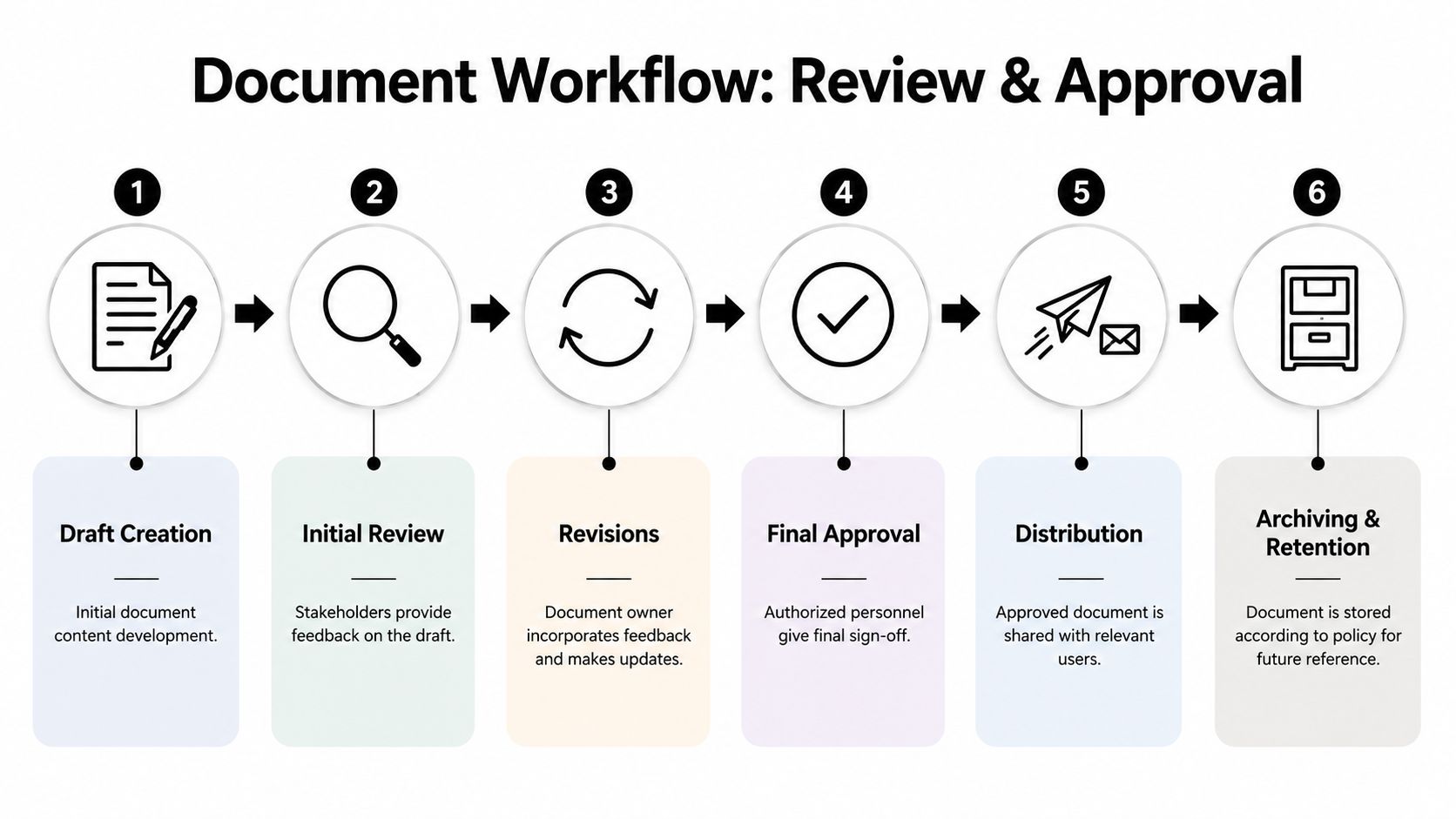
A workable review path looks like this:
| Stage | Decision needed | Typical owner |
|---|---|---|
| Draft | Is it complete enough to review | Originator |
| Review | Is it technically and contractually acceptable | Reviewer or discipline lead |
| Revision | Have comments been closed properly | Originator |
| Approval | Can it be issued for its intended use | Approver |
| Distribution | Who must receive it now | Document control or project admin |
| Archive | Should prior versions be retired from active use | Document control |
The common failure is sending the same document to too many people at once. That creates parallel comments, conflicting markups, and no single source of truth. Sequential review is slower on paper but cleaner in practice when the decision rights are clear.
This walkthrough is useful for teams training supervisors and coordinators on the basics of review stages:
Run audits in three phases
Audit discipline is what keeps workflows honest. Don't wait for a client audit or dispute to find out your registers are incomplete.
Run internal checks in three phases:
Preparation
Pull the live registers. Sample active drawings, RFIs, submittals, and superseded files. Confirm the audit is checking live practice, not just folder structure.Execution
Check naming, revision sequence, status, approval evidence, distribution records, and archive controls. Verify whether field teams and external trades can access the current approved version easily.Follow-up
Assign actions with owners. Fix root causes, not just bad filenames. If repeated issues come from external teams, change the access method or issue process rather than sending another reminder.
Site reality: The best audit question isn't “is the register complete?” It's “show me what the crew is building from today.”
Keep change control visible to every affected trade
Change control fails when revisions are issued without notice. A drawing may be updated correctly in the system, but if the affected subcontractor doesn't see it, the project still carries the risk.
For design changes, variation instructions, or revised shop drawings, make these controls mandatory:
- Affected-party mapping: Identify every trade, consultant, and supervisor touched by the change.
- Revision notice: Issue a formal alert tied to the revised document, not a general project email.
- Superseded lockout: Remove or clearly mark previous revisions so they can't be mistaken for active use.
- Field verification: Confirm the latest document is in the hands of the crew before work proceeds in the affected area.
That last step is where experienced teams separate themselves. They don't assume distribution equals adoption. They verify it.
Measuring Success with Audits Compliance and KPIs
A superintendent asks which drawing the steel crew is working from. The foreman holds up a PDF from last week, the fabricator has a newer revision in email, and your register says the latest issue went out two days ago. On paper, the process looks compliant. On site, you have a coordination failure with a cost attached to it.
That is why measurement matters. A document control procedure earns its keep when it prevents crews, consultants, and subcontractors from acting on outdated information. Audits and KPIs should test that point directly, especially across company boundaries where internal policy usually loses force.
Document control is also a sizeable operating function in its own right. The Australian document management services industry was projected to reach $808.0 million in 2026, with 80 registered businesses and 2.4% CAGR between 2021 and 2026, according to IBISWorld's analysis of Australia's document management services industry. For construction teams, that spend reflects a real need. Records, approvals, revision control, and access management all affect claims exposure, programme certainty, and site productivity.
Manual control versus platform control
Manual methods can hold together early in a project. They struggle once drawing volumes rise, RFIs start turning quickly, and external trades need current information without delay.
Here is the trade-off in plain terms:
| Method | What works | Where it breaks |
|---|---|---|
| Email chains | Fast for one-off communication | No reliable control over current revision, poor visibility across subcontractors and consultants |
| Spreadsheet registers | Low cost and familiar to project teams | Updates lag behind issued documents, weak audit trail, no enforcement |
| Shared folders | Central place to store files | Downloaded copies spread fast, status is unclear, offline misuse is common |
| Dedicated platform | Controlled issue, status visibility, revision history, role-based access | Needs setup, onboarding, and consistent enforcement from project leadership |
The failure points are predictable. A revised drawing is issued, but a subcontractor keeps building from the copy saved to a tablet. A consultant approves by email, but the evidence never makes it back into the register. A site manager needs proof of issue and someone spends half a day rebuilding the trail from inboxes and screenshots.
A platform does not solve weak discipline. It does, however, make enforcement possible. It can restrict who issues controlled documents, show live status, preserve approval history, and give external parties access to the current record without relying on forwarded attachments.
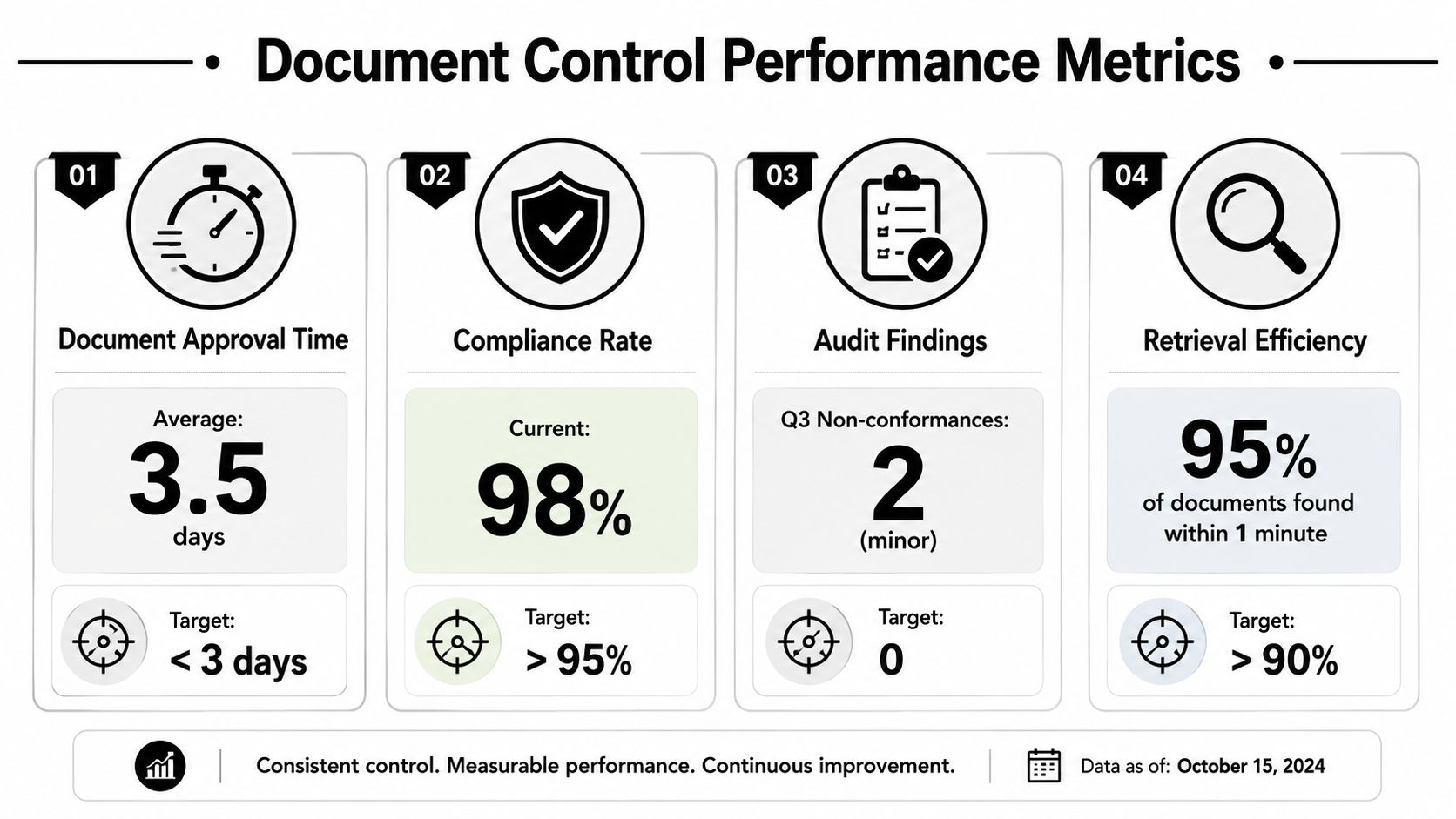
KPIs that tell you if the system works
A useful KPI set is short and tied to risk. If a measure does not help prevent delay, rework, or a dispute, it does not belong on the dashboard.
Track these:
- Approval cycle time: Long approval times hold up release to site and create pressure to build from drafts.
- Correct naming rate: Poor naming slows retrieval and increases the chance of the wrong file being used.
- Overdue reviews: These show where decisions are stalled and where programme slippage is forming.
- Superseded document incidents: Any live use of a retired revision is a direct control breach.
- Retrieval time for field users: If supervisors cannot pull up the current document fast, crews will fall back to saved copies or phone calls.
- External access success: Measure whether subcontractors and consultants can get the current controlled document without asking for it by email.
- Acknowledged issue rate for external parties: If revised documents are issued but not opened or acknowledged by affected trades, distribution has failed in practice.
The last two matter more than many teams admit. Internal compliance rates can look strong while external adoption is poor. That gap is where rework starts.
Use audits to test the same pressure points. Sample current drawings, RFIs, submittals, and variation records. Then check whether the people outside your organisation can access the live approved version, understand its status, and prove they received the update. If repeated failures sit with one trade package or consultant group, treat that as a process design issue, not a training issue alone. Change permissions, issue routes, and acknowledgement requirements until the field result improves.
Choosing the Right Tools and Avoiding Common Pitfalls
The wrong tool doesn't just frustrate people. It pushes them back to email, local downloads, and private folders. That's when even well-written document control procedures stop operating in practice.
Where projects usually come unstuck
Most failures are predictable:
- Inconsistent enforcement: Head office uses the platform, site teams still rely on forwarded PDFs.
- Too many issue channels: Documents move through email, chat, shared drives, and verbal instructions.
- Poor external access: Subcontractors can't see current records easily, so they save local copies and keep working.
- Weak status control: Files are revised, but nobody can tell whether they're approved for use.
- No field verification: Teams assume distribution means adoption.
The fix is rarely more training alone. It's usually simplification. One source of truth. One issue path. One visible status model.
What to look for in a construction document platform
Pick technology that matches construction workflows, not generic file storage. You want a system that can cope with multi-page drawing sets, revision linking, external stakeholders, and field access.
The shortlist should include:
- Controlled revision management: New revisions should link to previous ones and clearly supersede them.
- Structured approvals: Review and sign-off should happen inside the system, not in side emails.
- External stakeholder access: Consultants, suppliers, and subcontractors need controlled visibility without friction.
- Fast field retrieval: Site teams should be able to find current information quickly on mobile devices.
- Activity history: You need to see who viewed, issued, commented on, or approved a document.
- Archive discipline: Superseded documents must remain traceable without remaining easy to misuse.
This kind of interface is what teams should be aiming for in practice:
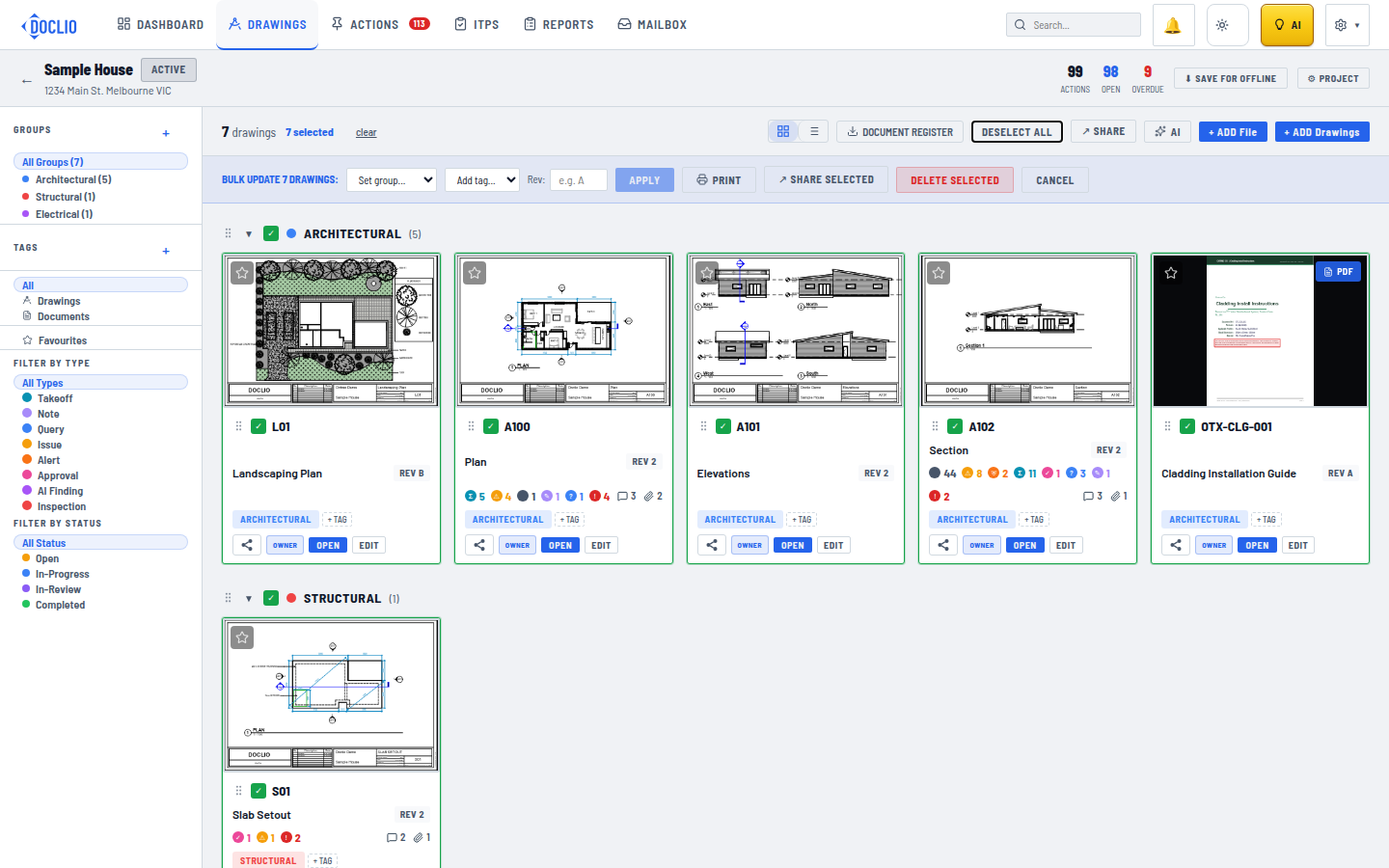
A final point matters more than any feature list. The best platform is the one your external teams will use under site pressure. If access is clumsy, approvals are hidden, or the current revision is hard to identify, people will fall back to attachments and screenshots. Once that happens, your document control procedures exist on paper but not on the project.
If your team is trying to enforce document control procedures across consultants, subcontractors, and field crews without losing speed, it's worth looking at Doclio. It's built for construction document management, with controlled drawings, linked revisions, structured approvals, external stakeholder access, and project-specific AI tools that help teams find and verify the right information fast.